Setting up a server may seem simple until you start looking into processors, memory, storage, controllers, network cards, power supplies, rail kits, and dozens of seemingly similar part numbers.
And that brings us to one of the most common questions: Is everything I'm selecting actually compatible with this server?
To make this process easier, we have developed a new way to configure our servers.
First, you choose the configurable server that best fits your project, and from there, the configurator guides you step by step, showing only the options that are compatible with that server.
First, choose the server
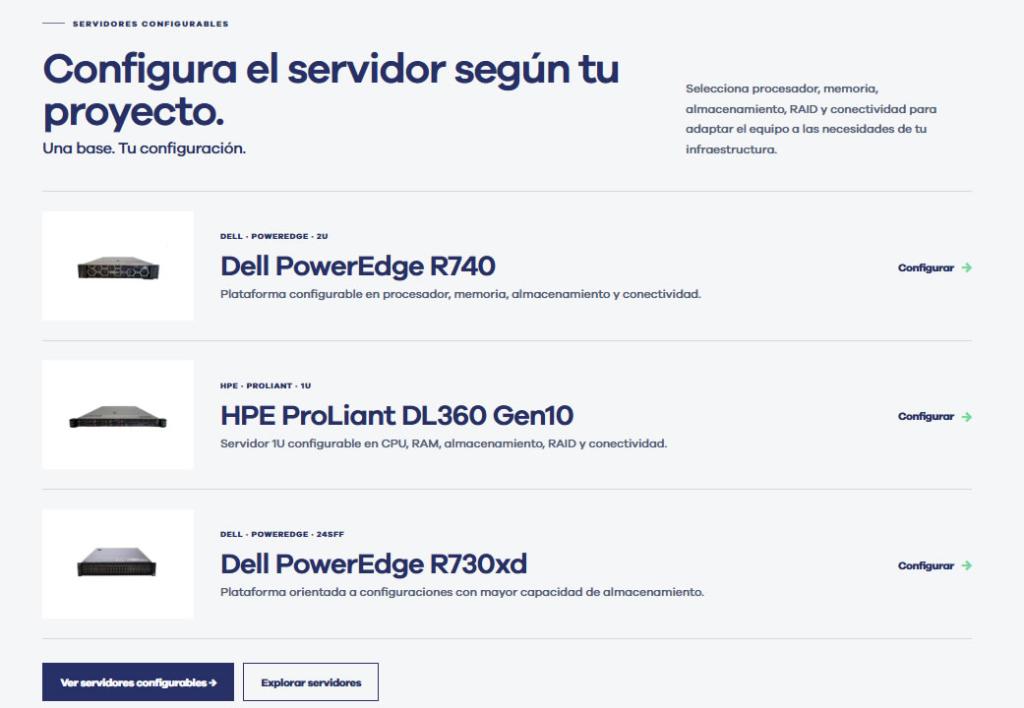
The process begins with our selection of configurable servers.
Once you've chosen the base model, you can start tailoring the configuration to the actual needs of your infrastructure.
View Configurable Servers
Then you configure each component step by step

The configurator breaks the process down into different steps so you don't have to go through the entire catalog of components.
Depending on the model you select, you can configure settings such as:
- Processor
- Heat Sink
- RAM
- RAID
- Wiring
- Storage
- Network Connectivity
- Expansion Cards
- Optical drives
- Power Supplies
- Additional Components
- Rail kits
At each step, the system displays the options that are available and compatible with the server you are configuring.
Fewer references. More clarity to help you decide.
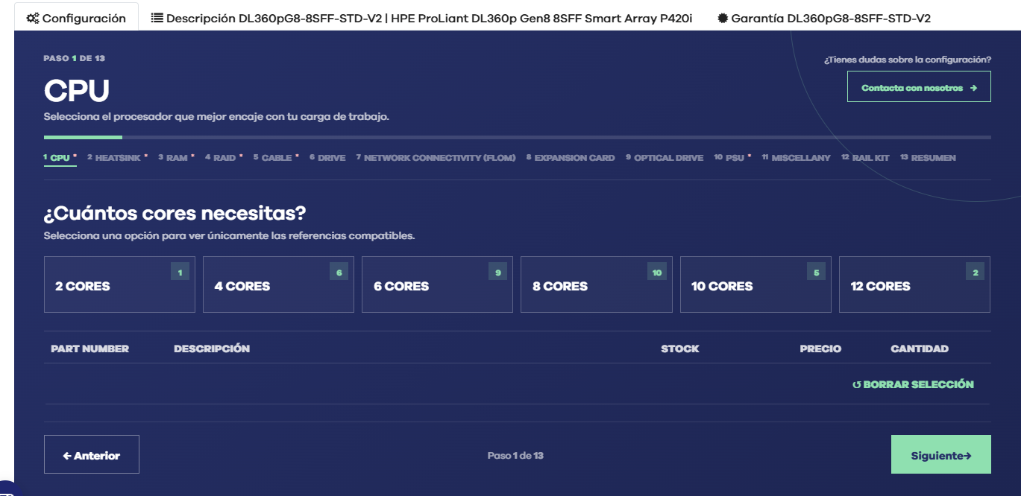
One of the main goals of the new configurator is to save you from having to manually check which part numbers are compatible with each piece of equipment.
For example, when selecting a processor, you can first filter by the number of cores you need and then view only the compatible CPUs.
The same logic applies to the rest of the process: first, you define the need, and then you look at the options that are compatible with the server.
This makes it easier to configure the system and reduces the risk of selecting incompatible components.
Inventory, price, and configuration in a single process
During setup, you can view information such as:
- Component Reference
- Description
- In stock
- Price
- Selected quantity
As you proceed, the configurator builds the complete server configuration.
When you're finished, you can review all the selected items and the total price before adding the configuration to your cart.
Need help? We're still here for you
The tool simplifies the process, but it does not replace technical advice.
Throughout the setup process, you can contact our team if you need to check compatibility, evaluate an alternative, or confirm which configuration is best suited for your project.
The idea isn't to leave you on your own with a configurator, but to combine a simpler shopping experience with technical support from MercadoIT.
Save, share, or review your settings
Once the configuration is complete, you can use it as a starting point to continue working on it.
Depending on the process, you can review the summary, add the settings to your cart, and share them so that others on your team can view them.
This is particularly useful in B2B settings, where the person who defines the technical requirements is not always the one who ultimately makes the purchase.
An easier way to configure and purchase refurbished servers
With this improvement, we want to simplify one of the most complex processes involved in purchasing IT hardware: choosing the right configuration without wasting time checking product specifications and compatibility one by one.
The process is simple:
Choose your server → configure the components → review the settings → add it to your cart or contact our team.
Want to give it a try?
Choose your server and set it up step by step.
View Configurable Servers