What is JBOD, and how does it differ from RAID?
When it comes to JBOD, the name says it all.
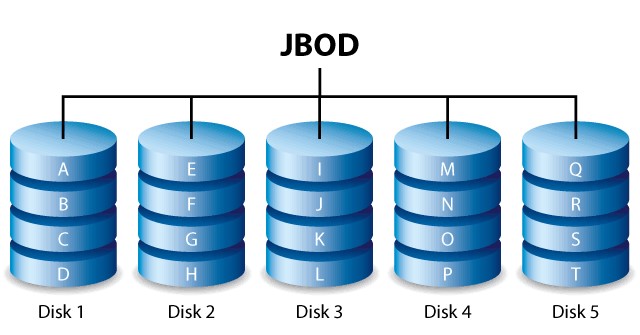
Image: JBOD diagram.
Credit: Network Encyclopedia
What is JBOD?
JBOD, which stands for "Just a Bunch of Disks" or "Just a Bunch of Drives," is a storage architecture consisting of numerous disk drives within a single storage enclosure.
JBOD enclosures are not typically configured to function as a RAID, but they can be.
By their very nature, JBOD enclosures are monoliths of storage capacity.
The drives in a JBOD enclosure can function as individual drives, be expanded to act as a single drive, or be configured to act as a RAID with the appropriate host system technology.
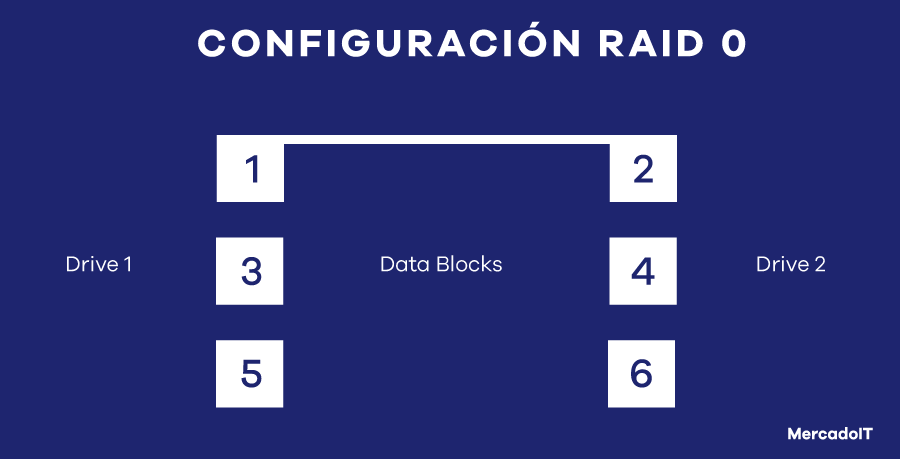
Photo: RAID 0, the simplest RAID level
What is RAID?
Redundant Array of Independent Disks (RAID) is a storage technology that provides protection against data loss by combining two or more hard disk drives (HDDs) or solid-state drives (SSDs) into a single, cohesive storage unit or array.
There are many different RAID levels, but the most common are RAID 0, RAID 1, RAID 5, RAID 6, and RAID 10.
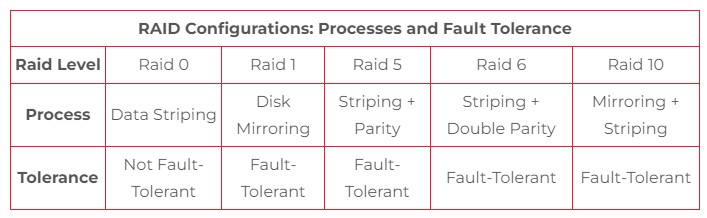
RAID storage protects against the total loss of data on a hard drive by duplicating or recreating that data and storing it on additional drives, a process also known as data redundancy.
How does JBOD compare to RAID?
JBOD and RAID use different methods to store data.
When functioning as a single drive, JBOD uses a method called spanning. If a disk reaches its capacity, the data is stored on the next disk, and so on throughout the array. The data is not fragmented, duplicated, or combined, as is the case with RAID.
The various RAID levels use different storage mechanisms to achieve data redundancy and fault tolerance, such as striping, mirroring, a combination of striping and mirroring, parity, and double parity.
For example, RAID 0 uses only striping; it splits data across the drives in the array and offers no data redundancy. In contrast, RAID 1 uses only mirroring; it duplicates data across the drives and provides data redundancy, although with a lower degree of fault tolerance than higher RAID levels.
Both RAID and JBOD support hard disk drives and solid-state drives of various capacities and storage interfaces, including high-speed NVMe SSDs.
Both JBOD and most RAID levels support hot-swapping, which means that a drive in the array can be replaced without shutting down the host system.
This is especially useful for programs and applications where users need to frequently access data stored on multiple servers.
Shutting down an entire system to replace a drive increases an organization’s downtime and, in turn, reduces productivity.
In mission-critical programs and applications, significant downtime and a decline in productivity can have catastrophic consequences, such as financial losses, public protests, serious injuries, and even death.
JBOD vs. RAID: Which Configuration Is Right for Me?
If you need large amounts of non-critical local storage for your program or application, choose a JBOD configuration.
In the case of RAID, most RAID levels have storage capacity limits due to data being duplicated or subjected to parity checks. RAID 0 is the only level where total storage capacity is not sacrificed, but it does not allow you to remove hard drives without losing the data stored on them.
RAID technology has its advantages, but it is particularly complex; if a drive in a RAID array fails, it can take a long time to rebuild due to the complexity of the procedure for certain RAID levels. This is in addition to the extra cost associated with the hardware required for this technology.
Always analyze in detail what your program or application requires in terms of storage, speed, and security.
If you have questions about selecting your storage system, please contact us so we can help you choose what your project truly needs, with both economic and environmental benefits.