In this post, we'll take a detailed look at the
RAID 0 and
RAID 1 data storage levels.
RAID Level 0 - Striping
In a RAID 0 array, system data is divided into blocks that are written to all drives in the array. By using multiple drives (at least two) simultaneously, it offers superior I/O performance. This performance can be further improved by using multiple controllers, ideally one controller per drive.
Advantages of RAID 0
- RAID 0 offers high performance for both read and write operations. There is no overhead caused by parity checks.
- All storage capacity is being used; there is no overload.
- The technology is easy to implement.
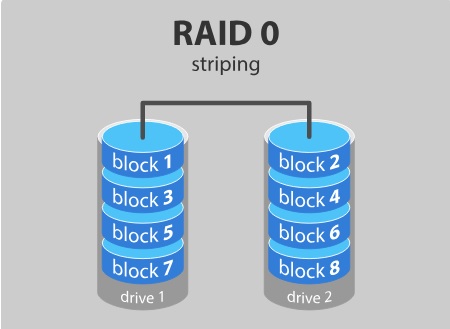
RAID 0 is ideal for non-critical data storage that requires high-speed read/write operations, such as in an image retouching or video editing workstation.
However, RAID 0 is not fault-tolerant. If a drive fails, all data on the RAID 0 array is lost. It is not recommended for mission-critical systems.
If you want to use RAID 0 simply to combine the storage capacity of two drives into a single volume, consider mounting one drive in the folder path of the other drive. It is compatible with Linux, OS X, and Windows, and has the advantage that a single drive failure has no impact on the data on the second hard drive or SSD.
RAID Level 1 – Mirroring
Data is stored twice by writing it to both the data drive (or set of data drives) and a mirror drive (or set of mirror drives). If a drive fails, the controller uses the data drive or the mirror drive for data recovery and continues operation. You need at least two drives for a RAID 1 array.
Advantages of RAID 1
- RAID 1 offers excellent read speeds and write speeds comparable to those of a single drive.
- If a drive fails, the data does not need to be reconstructed; it simply needs to be copied to the replacement drive.
- RAID 1 is a very simple technology.
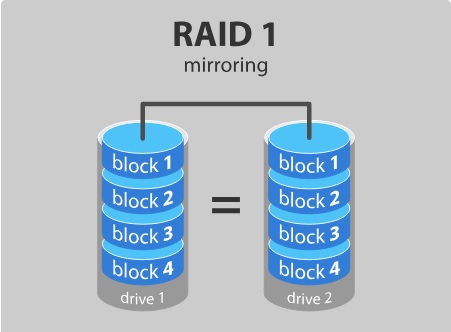
The main disadvantage is that the effective storage capacity is only half the total capacity of the disk because all data is written twice.
RAID 1 solutions do not always allow for hot-swapping of a failed drive. This means that the failed drive can only be replaced after shutting down the computer to which it is connected. For servers used simultaneously by many people, this is not feasible. These systems typically use hardware controllers that support hot-swapping.
RAID 1 is ideal for mission-critical storage, such as accounting systems. It is also suitable for small servers that will use only two data drives.
We hope you found this article helpful. If you have any questions regarding server solutions, please don’t hesitate to
Contact Us. To view all data storage tiers, read the article
RAID Types and Their Characteristics.