It is possible to combine the advantages (and disadvantages) of
RAID 0 and
RAID 1 in a single system.
RAID 10 is a hybrid RAID configuration that provides data protection by duplicating all data on secondary drives while using striping across each drive set to speed up data transfers.
Advantages of RAID 10
If something goes wrong with one of the drives in a
RAID 10 configuration, the rebuild time is very fast, since all that’s needed is to copy all the data from the surviving mirror to a new drive. This can take as little as 30 minutes for 1 TB drives.
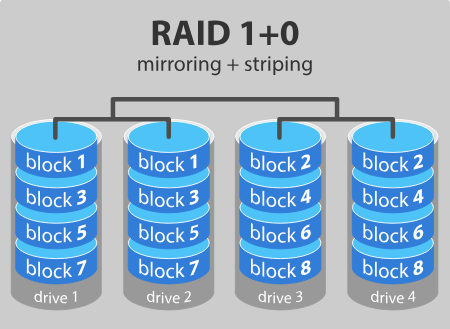
Half of the storage capacity is allocated to data replication, so compared to large arrays such as RAID 5 or RAID 6, this type of data storage is more expensive to achieve redundancy.
To see the advantages of the
RAID 5 and
RAID 6, visit our post:
Data Storage Levels: RAID 5 and RAID 6
What do we know about RAID levels 3, 4, and 7?
These levels exist but are not very common (RAID 3 is essentially like RAID 5 but with parity data always written to the same drive).
RAID 3: This technique uses striping and dedicates one drive to storing parity information. Embedded ECC information is used to detect errors. Data recovery is performed by calculating the exclusive OR (XOR) of the information stored on the other drives. Since an I/O operation addresses all drives at the same time, RAID 3 cannot overlap I/O. For this reason, RAID 3 is best suited for single-user systems with long-running applications.
RAID 4: This level uses large stripes, which means it can read records from any individual drive. This allows it to use overlapped I/O for read operations. Since all write operations must update the parity drive, I/O overlap is not possible. RAID 4 offers no advantage over RAID 5.
RAID 7: This RAID level is based on RAID 3 and RAID 4 but adds caching to the mix. It includes a built-in real-time operating system as a controller, caching via a high-speed bus, and other features of a standalone computer.
Benefits of RAID
Performance, reliability, and cost are among the main benefits of RAID. By combining multiple hard drives, RAID can improve the performance of a single hard drive and, depending on how it is configured, can increase a computer's speed and reliability after a failure.
All RAID levels, except RAID 0, offer protection against a single-drive failure. A system like RAID 6 can even recover data from two hard drives that fail simultaneously.
Backups can be stored off-site at a different location. This can be useful if a natural disaster or fire destroys your workplace.
The most important reason to back up multiple generations of data is user error. If someone accidentally deletes important data and this goes unnoticed for several hours, days, or weeks, a good set of backups ensures that you can still recover those files.